Introduction
Choosing the Best Sim Racing Monitors is one of the fastest ways to improve lap consistency, spatial awareness, and overall immersion. In sim racing, your monitor is not just a display—it is your “windshield.” The right screen size, curvature, resolution, refresh rate, and response behavior can make braking points clearer, apexes easier to judge, and traffic management more predictable.
This guide reviews five monitor picks that work well for popular sim titles like iRacing, Assetto Corsa Competizione, and F1, then gives a practical buying guide so you can match a monitor to your rig, GPU, and space.
Top 5 Sim Racing Monitors
Each pick below includes a short description, key features, pros, and cons.
1) Best Overall: Samsung Odyssey G9 (49″ Super Ultrawide)
Description: The Samsung Odyssey G9-style 49-inch super ultrawide is a strong “one-and-done” choice for many sim racers because it delivers a wide field of view without the complexity of triple monitors. The wraparound shape helps you track corner exits and side-by-side battles more naturally than a standard 16:9 display. If you want maximum immersion from a single screen and you have enough desk/rig width, this is often the most satisfying upgrade.
Key features
- 49″ super ultrawide format that approximates two 27″ 16:9 panels side-by-side
- Curved panel designed to wrap around peripheral vision
- High refresh-rate variants available, with adaptive sync support on many models
- Strong contrast and brightness on many Odyssey lines
Pros
- Excellent immersion for a single-monitor setup
- Wider field of view improves awareness in wheel-to-wheel racing
- Reduces the “window” feeling common with smaller 16:9 screens
- Cleaner setup than triples (one mount, one signal path)
Cons
- Requires significant space and a sturdy mount/stand
- Demands more GPU power than standard 1440p 16:9 monitors
- Not every game UI scales perfectly on super ultrawide without tweaking
- Premium price compared with standard monitors
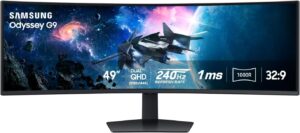
Samsung 49” Odyssey G9 Series DQHD 1000R Curved Gaming Monitor
This 49-inch 1000R curved Dual QHD monitor wraps your entire field of view for a deeply immersive experience. A 240Hz refresh rate and 1ms response deliver ultra-smooth, blur-free action, while 1000-nit peak brightness and strong contrast reveal fine detail. AMD FreeSync Premium Pro reduces stutter, and ergonomic adjustments plus PBP/PIP multitasking complete a premium setup.
2) Best for Single Monitor Setups: Gigabyte M32U (32″ 4K, High Refresh)
Description: If your rig layout or budget points you toward one traditional monitor, a 32-inch 16:9 display can be a practical sweet spot. The Gigabyte M32U-type 32″ 4K high-refresh monitor provides sharp cockpit details, crisp trackside signage, and clean HUD readability. It is especially appealing if you also use the same monitor for work, content consumption, or console gaming, because 4K at 32 inches looks tidy without demanding a massive desk footprint.
Key features
- 32″ 16:9 size that fits most rigs and monitor stands
- 4K resolution for crisp text, textures, and instrument clarity
- High refresh support with adaptive sync on many models in this class
- Typically strong connectivity for PC setups
Pros
- Very sharp image quality—great for dashboards and distant markers
- Easier to mount and position than ultrawide or triple setups
- Versatile: works well outside sim racing (work, media, console)
- Often better value than premium ultrawide OLED options
Cons
- 4K can be demanding; you may need to reduce settings for stable FPS
- Narrower peripheral coverage versus ultrawide/triples
- Motion clarity varies by panel; choose carefully if you are sensitive to blur
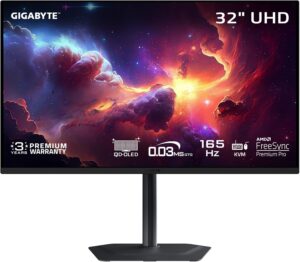
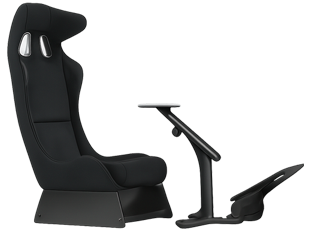
Playseat Trophy Sim Racing Cockpit
Experience exceptional clarity and fluid gameplay with GIGABYTE M Series monitors. The MO32U combines an ultra-fast 0.03ms GTG response time with a 165Hz refresh rate for smooth, responsive motion. With the built-in Type-C KVM feature, you can control and switch between connected devices at the press of a button—ideal for both gaming and productivity.
3) Best Safety Features: BenQ MOBIUZ EX3415R (34″ Ultrawide with Eye-Care)
Description: “Safety” for monitors is less about impact resistance and more about long-session comfort: eye strain, flicker, glare, and posture issues. The BenQ MOBIUZ EX3415R-style ultrawide is popular for players who do endurance stints or long practice blocks because it emphasizes comfort features such as low-flicker behavior and blue-light reduction. It also lands in a very usable size: 34-inch ultrawide gives noticeably more lateral view than 16:9 without the space demands of a 49-inch panel.
Key features
- 34″ ultrawide format that improves side visibility vs 16:9
- Eye-care oriented settings (blue light reduction, flicker control)
- Curved design helps reduce edge distortion and head movement
- Typically solid built-in audio options (useful for simple setups)
Pros
- Better comfort for long sessions, especially at night
- Wider view improves awareness without extreme hardware requirements
- Easier fit for medium rigs and desks than a 49″ super ultrawide
- Practical balance of immersion and simplicity
Cons
- Not as immersive as 49″ super ultrawide or triple monitors
- “Eye-care” features vary in effectiveness depending on user sensitivity
- Some ultrawides prioritize features over pure competitive motion clarity

BenQ MOBIUZ EX3410R Curved Gaming Monitor
This 34-inch WQHD 21:9 curved VA ultrawide monitor delivers smooth gameplay with a 144Hz refresh rate, 1ms MPRT response, and FreeSync Premium. Built-in speakers with a 2.1-channel amp and 5W subwoofer save desk space and add punchy bass. HDRi and Light Tuner enhance contrast and color.
4) Best for Competitive Smoothness: Samsung Odyssey G7 (32″ QHD, High Refresh)
Description: If you care most about fast, smooth motion—clean panning through corners, clear visual feedback under heavy steering corrections, and stable tracking during close racing—a high refresh QHD monitor is a strong direction. The Odyssey G7-type 32″ QHD high-refresh display targets motion performance while keeping resolution manageable for mid-to-high GPUs. For competitive racing, consistent frame pacing and motion clarity often matter more than pure pixel count.
Key features
- 32″ QHD resolution that balances clarity and GPU load
- High refresh rate variants with adaptive sync support
- Aggressive curvature on many G7 models can enhance immersion
- Strong motion performance tuning in this category
Pros
- Smooth cornering visuals and reduced perceived blur at high FPS
- QHD is easier to drive than 4K while still looking sharp
- Large 32″ size gives presence without ultrawide complexity
- Good choice for drivers focused on performance over maximum FOV
Cons
- Curvature can feel strong for mixed desktop use
- QHD is less crisp than 4K for text-heavy tasks
- Best results depend on maintaining high, stable FPS
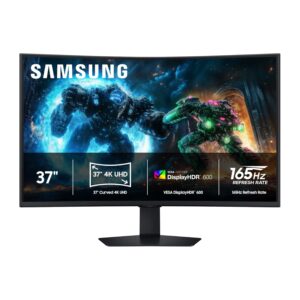
Samsung’s 37-inch Odyssey G7 Curved Gaming Monitor delivers impressive 4K UHD realism in a 1000R curved design that wraps around your field of view for deeper immersion. VESA DisplayHDR 600 enhances contrast with brighter highlights and deeper blacks, improving clarity in dark scenes. With a 165Hz refresh rate and near-instant 1ms (GtG) response time, it minimizes lag and motion blur for smooth, responsive gameplay.
5) Best Value: Dell S3422DWG (34″ Ultrawide Budget Performer)
Description: Value matters because sim racing often competes with other upgrades: wheelbase, pedals, cockpit, and PC parts. The Dell S3422DWG-style 34″ ultrawide often represents a cost-effective path to a wider field of view without premium pricing. It can deliver a meaningful upgrade from 27″ 16:9—more lateral vision, better immersion, and a more “cockpit-like” framing—while keeping the setup simple and affordable.
Key features
- 34″ ultrawide size for immersion at a reasonable footprint
- Usually QHD ultrawide resolution that is manageable for many GPUs
- Curved screen helps keep edges within comfortable viewing angles
- Strong general-purpose feature set for the price tier
Pros
- Excellent immersion-per-dollar compared with many premium options
- Easier to run than 49″ super ultrawide or triple 1440p setups
- Works well for both sim racing and everyday desktop use
- Widely compatible with standard mounts (verify VESA support)
Cons
- Motion performance may be less refined than higher-end models
- HDR and peak brightness are often limited in value monitors
- Uniformity can vary—check return policy and panel quality
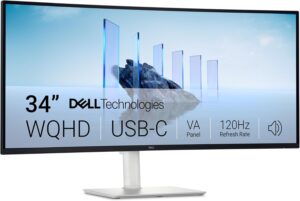
Dell 34 Plus USB-C Curved Monitor
This monitor is designed for comfortable all-day use and smooth performance. ComfortView Plus reduces harmful blue-light emissions to ≤35% while preserving accurate colors. For work and play, it supports AMD FreeSync Premium with up to 120Hz refresh rate and an ultra-fast 0.03ms response time for a tear-free, responsive feel. Color reproduction is strong with 99% sRGB and 95% DCI-P3 coverage, paired with a VA panel, 3000:1 contrast, and HDR readiness for richer depth and detail. Audio is upgraded with higher output and a wider frequency range. A single USB-C cable simplifies connectivity and can deliver up to 65W power.
Buying Guide
What makes “Best Sim Racing Monitors” different from normal gaming monitors?
A standard gaming monitor can be “fast,” but sim racing adds specific demands: consistent motion clarity during panning, comfortable viewing over long stints, and a shape/size that supports realistic field of view. The Best Sim Racing Monitors usually emphasize at least one of these outcomes: (1) wider peripheral coverage (ultrawide or triples), (2) stable high refresh with low blur, and (3) comfort features that reduce fatigue. In sim racing, feeling confident in your visual cues—brake markers, curbs, and car positioning—often matters as much as raw image quality.
How to choose the right monitor for your rig and GPU
Start with your physical constraints and then match performance expectations:
-
Space and mounting: Measure your rig width and the maximum distance from your eyes to the screen. Larger and wider screens need stronger mounts and careful positioning.
-
GPU capability: If you run 4K or super ultrawide, you are effectively pushing more pixels per frame. If your FPS drops often, the experience can feel worse than a lower-resolution monitor with stable performance.
-
Your priority: If immersion is your top goal, go ultrawide/super ultrawide. If competitive smoothness is the goal, target QHD high refresh with strong motion handling. If comfort is the goal, focus on eye-care and a size that reduces head turning.
Factors to consider before buying
-
Screen size and aspect ratio:
-
27″–32″ 16:9 is simple and versatile.
-
34″ 21:9 is a practical immersion upgrade.
-
49″ super ultrawide maximizes single-screen FOV.
-
-
Curvature: Curved panels can feel more natural for ultrawide viewing. Too much curvature can be distracting for productivity tasks.
-
Resolution:
-
QHD is a strong balance for many sim racers.
-
4K looks very sharp but is more demanding.
-
-
Refresh rate and motion handling: Higher refresh helps motion clarity, but only if your system can hold the FPS. Response tuning and overdrive behavior matter.
-
Panel type: Different panel technologies trade off contrast, color, and motion characteristics. Prioritize what you notice most: blacks/contrast, clarity, or smoothness.
-
Adaptive sync: Helps reduce tearing and stutter when FPS fluctuates.
-
Connectivity and ergonomics: Make sure you have the right ports, enough bandwidth, and a stand/mount that supports your positioning goals.
Conclusion
The Best Sim Racing Monitors are the ones that match your space, your GPU, and your driving priorities. For maximum single-screen immersion, a 49″ super ultrawide like the Odyssey G9 is hard to beat. If you want a practical all-rounder, 32″ monitors in QHD or 4K are reliable choices. If long sessions matter, comfort-focused ultrawides can reduce fatigue. Choose based on the outcome you want—immersion, smoothness, or value—and you will feel the upgrade every time you hit the apex.

My name is David Miller, and I’m a sim racing enthusiast with a passion for realistic driving and smart, affordable setups. I started sim racing years ago with basic gear and a single monitor, and slowly upgraded to better wheels, pedals, and rigs as I learned more about car control, racecraft, and setup tuning.