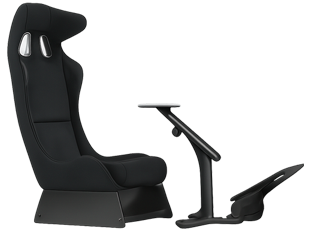
Learn exactly how to build the Best Sim Racing rig on a low budget without sacrificing realism. This 2025 guide covers DIY wooden rigs, best value wheels like Logitech G29, and smart software tweaks to get you on track for under $500.
How to build the Best Sim Racing rig on a low budget: The Master Plan
Before we buy a single screw or bid on a single eBay listing, we need a strategy. The biggest mistake beginners make is blowing 80% of their budget on a fancy steering wheel, only to realize they have to mount it to a wobbly ironing board.
To build the Best Sim Racing rig on a low budget, you must apply the “40/40/20 Rule” of resource allocation. This formula ensures your rig is balanced, preventing bottlenecks that kill immersion.
-
40% – The Interface (Wheel & Pedals): This is your connection to the road. It needs to give you Force Feedback (FFB) and precise braking control.
-
40% – The Engine (PC or Console): You need stable frame rates. A stuttering game makes you crash, no matter how good your wheel is.
-
20% – The Chassis (Rig & Seat): Rigidity is king. If your seat flexes when you brake, you lose time.
The Budget Racer’s Mindset:
Forget the phrase “Buy Nice or Buy Twice.” That is advice for rich people. Your motto is “Buy Used, Sell Later.” Sim racing gear holds its value incredibly well. You can buy a used setup today, use it for a year, and often resell it for exactly what you paid.
Step 1: Choosing the Best Value Wheel & Pedals
The steering wheel is the heart of your setup. In 2025, the market is flooded with options, but for the budget-conscious builder, there are two distinct paths: the reliable Used Market or the new wave of Budget Direct Drive.
The “Used Market” Goldmine (Logitech & Thrustmaster)
If your definition of “low budget” is under $200 for the entire wheel and pedal set, you must look at the second-hand market.
The Logitech G29 (PlayStation/PC) and G920 (Xbox/PC) are the Toyota Corollas of sim racing. They are not flashy, and they use older gear-driven technology that can be a bit noisy (“clunky”), but they are virtually indestructible.
-
Where to look: Facebook Marketplace, eBay, and Craigslist.
-
Target Price: Aim for $120 – $150.
-
What to check: When buying used, ask the seller about the pedals. The “potentiometers” (sensors) in the pedals can get dirty over time, causing the signal to flicker. This is easily fixed with a can of contact cleaner, but it’s a good bargaining chip to lower the price.
Alternatively, the Thrustmaster T300RS offers a smoother belt-drive mechanism. It is quieter and stronger but check for “fading” issues where the wheel loses power after long sessions.
New Budget Kings: Cammus C5 vs. Logitech G29
If you can stretch your budget to the $250 – $300 range, the landscape changes dramatically. In 2025, we have seen the rise of “entry-level Direct Drive.”
Direct Drive (DD) means the steering wheel is mounted directly to the motor shaft. There are no gears or belts to dilute the feeling of the road. It was once reserved for pros, but companies like Cammus have disrupted the market.
| Feature | Logitech G29 (New) | Cammus C5 (Direct Drive) |
| Technology | Gear Drive (Old School) | Direct Drive (Modern) |
| Torque | ~2.1 Nm (Weak) | 5 Nm (Strong) |
| Force Feedback | Notchy, deadzone in center | Instant, crisp, detailed |
| Pedals | Included (3 Pedals + Clutch) | Included (2 Pedals usually) |
| Price | ~$230 (New) | ~$250 (New) |
The Verdict: If you are strictly learning how to build the Best Sim Racing rig on a low budget, buying a used Logitech G29 allows you to allocate more money to the cockpit. However, if buying new, the performance leap of the Cammus C5 is worth every extra penny.
Step 2: The Cockpit – DIY Wood vs. Wheel Stands
You have your wheel. Now, where do you put it?
Do not clamp it to your desk.
When you brake hard, your office chair rolls backward. When you turn sharply, your desk rattles. This instability destroys your muscle memory. You need a dedicated “rig” (cockpit).
The “2×4 Special”: Building a DIY Wooden Rig for $50
This is where the true “DIY Spirit” shines. Wood is cheap, sturdy, and easy to work with. A custom wooden rig is often more rigid than metal rigs costing $500.
The “Junkyard Safari” Method:
-
The Seat: Do not buy a generic “Gaming Chair.” They are uncomfortable and flimsy. Instead, go to a local auto salvage yard (Pick-n-Pull). Find a passenger seat from a real car (BMW 3-Series, Honda Civic, or Mazda 3 are great choices). Real car seats are designed for thousands of hours of sitting and crash safety. You can usually grab one for $30 – $40.
-
The Frame: Go to the hardware store and buy:
-
Six 8-foot lengths of 2×4 lumber.
-
A box of wood screws.
-
Some black spray paint (optional, if you want it to look “pro”).
-
-
The Build: Look up “Simul8r PVC plans” or “Ricmotech RS1 DIY” online. Even a simple rectangular frame that bolts your seat and wheel together will be rock solid.
“At Lyoncafe, we appreciate the craftsmanship of building your own tools. There is a profound sense of satisfaction when you hit a perfect apex in a cockpit you built with your own hands for the price of a nice dinner.”
Wheel Stands: The Foldable Alternative
If you live in an apartment or share a room, building a massive wooden coffin might not be feasible. In this case, a Wheel Stand is the compromise.
-
Recommendation: Look for the GT Omega Classic or generic clones on Amazon.
-
The “Chair Link” Trick: The biggest issue with wheel stands is that your chair still rolls away. To fix this for free, put two shoes (sneakers) on the rear wheels of your office chair. The rubber soles grip the carpet/floor and lock you in place surprisingly well.
Step 3: The Display – Using What You Already Own
The most common budget-killer in sim racing is the belief that you need a specialized gaming monitor immediately. You don’t. In fact, for the budget builder, the best screen is likely the one already hanging in your living room or sitting on your desk.
When answering “How to build the Best Sim Racing rig on a low budget”, our philosophy at Lyoncafe is simple: Optimize what you have before buying what you want.
TV vs. Monitor: Which is Better for Budget Sim Racing?
Most beginners assume a TV is too slow for gaming. While this was true in 2015, modern televisions are surprisingly capable.
-
The “Game Mode” Secret: Dig into your TV’s settings menu. Enabling “Game Mode” bypasses the post-processing effects (like motion smoothing), often dropping input lag from 100ms to a respectable 10-20ms.
-
Size Matters: In sim racing, immersion comes from scale. A 55-inch TV placed right behind your steering wheel fills more of your peripheral vision than a 24-inch gaming monitor ever could.
-
The Placement Rule: Move the screen as close to your eyes as physically possible. Every inch closer increases your “perceived speed” and allows you to see braking markers more clearly.
Pro Tip: If you are building the DIY wooden rig mentioned in Step 2, design it so the TV stand can slide over the pedals, placing the screen just behind the steering wheel rim. This “integrated” look mimics a real dashboard.
VR on a Budget: Is the Quest 2 Worth It in 2025?
If you simply cannot fit a triple monitor setup or a large TV in your space, Virtual Reality (VR) is the ultimate cheat code for budget immersion.
-
The Used Market Hero: The Oculus (Meta) Quest 2 can now be found on the used market for $150 – $200.
-
The Experience: VR puts you inside the car. You can look into the apex of the corner naturally. The depth perception allows you to judge braking distances instinctively, something that is very hard to learn on a flat screen.
-
The Trade-off: It requires a slightly stronger PC (you can’t run VR on a laptop with integrated graphics), but for the price of a cheap monitor, you get the immersion of a $10,000 setup.
Step 4: Free Software Tweaks for Premium Immersion
You have built the rig, bought the used wheel, and set up the TV. You have spent maybe $400. Now, how do we make it feel like a $2,000 simulator? The answer lies in physics and mathematics, not money.
Drawing from our background in optimization—much like how we analyze the most effective nutrient absorption at topsupplementbrands.com—we know that tweaking the inputs yields better outputs.
Field of View (FOV) Optimization
The single biggest mistake rookies make is driving with the incorrect Field of View. They leave the camera on default, which creates a “fisheye” effect to make the game look faster.
-
The Problem: This distorts distance. A corner that looks 100 meters away is actually 50 meters away. You brake late, you crash, and you blame the game.
-
The Fix: Use a free FOV Calculator online. Measure the distance from your eyes to the screen and the width of your screen. Input these numbers into the simulator settings.
-
The Result: It might feel like you are looking through a periscope at first. You lose the sense of speed. Do not change it back. Within 10 laps, your brain will calibrate. You will hit apexes with surgical precision because 1 meter on screen finally equals 1 meter in the physics engine. This upgrade costs $0 but makes you faster instantly.
Bass Shakers: The Cheap “Motion” Rig Hack
Want to feel the engine RPM and the road bumps in your seat without buying a $5,000 motion platform?
-
The DIY Tactile Transducer:
-
Buy two Dayton Audio TT25 “Puck” transducers (~$20 each).
-
Buy a cheap mini-amplifier (~$30 on Amazon).
-
Screw one puck under your pedal plate (to feel ABS/lockups) and one under your seat (to feel engine vibration/gear shifts).
-
Download the free software SimHub.
-
-
The Magic: SimHub reads the game’s telemetry and sends low-frequency bass to the pucks. When you run over a curb, your seat shakes. When you lock your tires, your brake pedal vibrates. It adds a physical layer of information that helps you drive at the limit.
Common Mistakes That Kill Your Budget
We have guided hundreds of newcomers through their first builds at Lyoncafe. We have seen the triumphs, but we have also seen the wasted money. To ensure you stay under budget, avoid these three “newbie traps.”
Trap 1: The “Cool Factor” Priority Beginners often spend money on a handbrake or a sequential shifter before they even have a solid brake pedal.
-
The Truth: Unless you are exclusively drifting, you do not need a handbrake. Paddle shifters are faster for racing. Spend that $100 on upgrading your brake pedal springs instead.
Trap 2: Buying Wobbly Tube Rigs There are many cheap “gaming cockpits” on Amazon that look like tubular steel frames.
-
The Issue: They wobble. The center post often sits right between your legs, interfering with your braking. Once you buy one, they have zero resale value because nobody wants them. Stick to the DIY wood route or a verified sturdy wheel stand.
Trap 3: Neglecting Comfort You cannot race if your back hurts.
-
The Fix: Prioritize the angle of your seat and pedals. Your knees should be slightly bent, and your arms should form a 90-degree angle when holding the wheel. Ergonomics are free, but back surgery is expensive.
Conclusion: Your Low Budget Rig Starts Today
As the ancient proverb goes, ” The arrow is only as effective as the archer.”
A $20,000 rig will not make you a champion. It might make the experience more comfortable, but it cannot teach you racecraft, patience, or the racing line. Those are skills you earn through practice, regardless of whether you are sitting in a carbon fiber tub or a wooden frame you built in your garage.

My name is David Miller, and I’m a sim racing enthusiast with a passion for realistic driving and smart, affordable setups. I started sim racing years ago with basic gear and a single monitor, and slowly upgraded to better wheels, pedals, and rigs as I learned more about car control, racecraft, and setup tuning.